
Medicare Easy Pay
Many people are surprised when their first Medicare Part B bill shows up in the mail — especially when the amount is much higher than expected.
“Wasn’t Medicare Part B supposed to be a monthly premium?”
Yes… but here’s the catch
By default, Medicare bills quarterly and sends a paper bill. That means your first bill can easily be several hundred dollars.
The good news? There’s a much simpler option: Medicare Easy Pay.
New To Medicare
- Medicare 101: Turning 65
- Common Medicare Mistakes to Avoid
- How to Enroll in Medicare
- Understanding the Parts of Medicare
- Part A – Inpatient Hospital
- Part B – Outpatient Medical
- Part C – Medicare Advantage
- Part D – Prescription Drugs
- When Should You Enroll in Medicare?
- Medicare Cost [2026 Updated]
- Medicare IRMAA Explained
- How To Set Up Medicare Easy Pay
Medicare Easy Pay
Many people are surprised when their first Medicare Part B bill shows up in the mail — especially when the amount is much higher than expected.
“Wasn’t Medicare Part B supposed to be a monthly premium?”
Yes… but here’s the catch
By default, Medicare bills quarterly and sends a paper bill. That means your first bill can easily be several hundred dollars.
The good news? There’s a much simpler option: Medicare Easy Pay.
What Is Medicare Easy Pay?
Medicare Easy Pay allows your Medicare Part B premium to be automatically withdrawn from your bank account each month.
Instead of worrying about paper bills, due dates, or missing a payment, your premium is paid automatically.
Why we recommend Medicare Easy Pay
✔ No paper bills
✔ Monthly payments instead of quarterly
✔ Reduces the risk of missed payments
✔ Keeps your Medicare coverage uninterrupted
On your bank statement, the charge will appear as “CMS Medicare Premium.”
How to Sign Up for Medicare Easy Pay
There are two ways to enroll in Medicare Easy Pay:
1. Mail in a form(SF-5510 – Authorization Agreement for Preauthorized Payments)
2. Sign up online through your Medicare.gov account
We strongly recommend the online option — it’s faster, easier, and much less likely to get delayed.
Below is a step-by-step walkthrough.
Step-by-Step: Enrolling Online
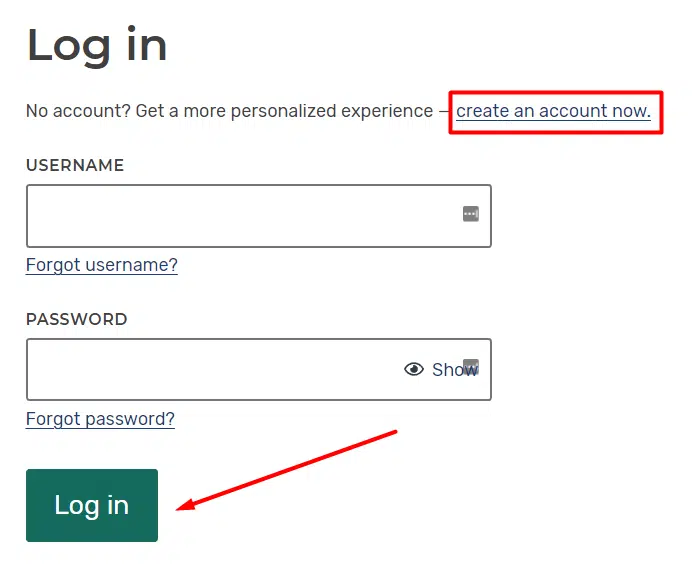
Step 1: Log In to MyMedicare.gov
Visit www.medicare.gov and log in using your username and password.
If you don’t have an account yet, click “Create an account” and follow the prompts.
📌 Tip: Save your login information. Your Medicare account contains billing history, coverage details, and important notices you may need later.
Step 2: Access Your Premium Information
Once logged in:
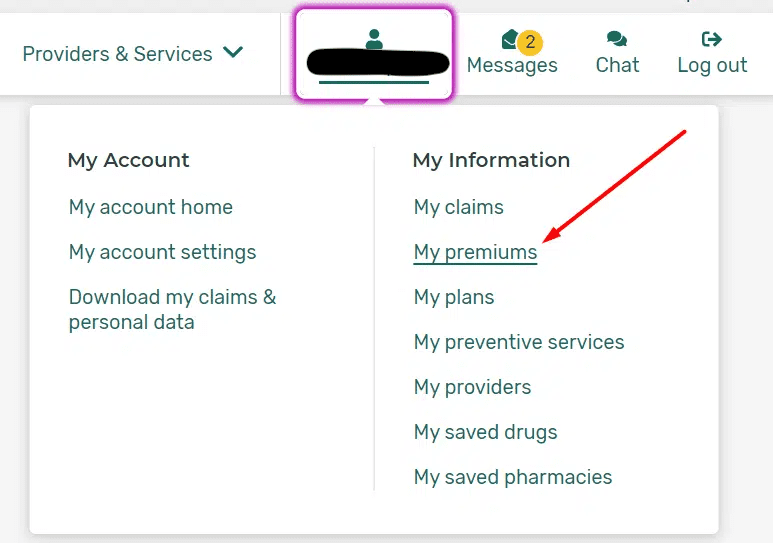
Click your name in the top-right corner
Select My Account / My Information
Click My Premiums
Step 3: Locate the Easy Pay Sign-Up
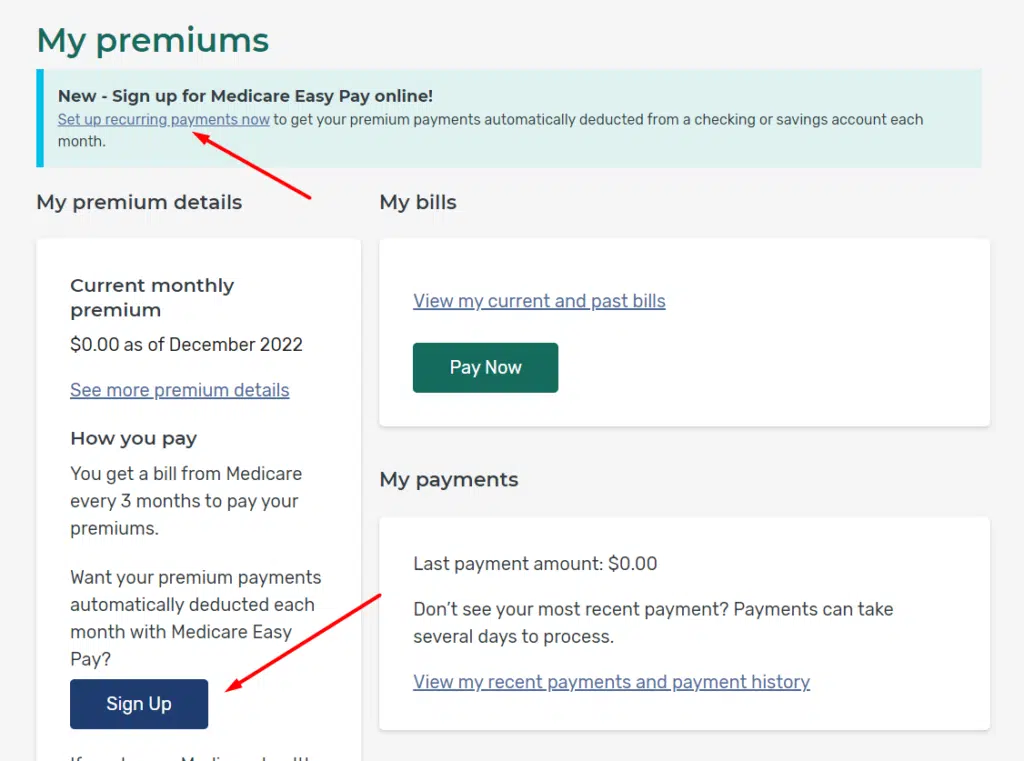
Inside the My Premiums section, you’ll see:
- Your current Part B premium
- Billing history
- Payment status
If you’re brand new to Medicare, some details may not appear yet — that’s completely normal.
To enroll in Medicare Easy Pay, click the “Sign Up” button.
Step 4: Enter Bank Information
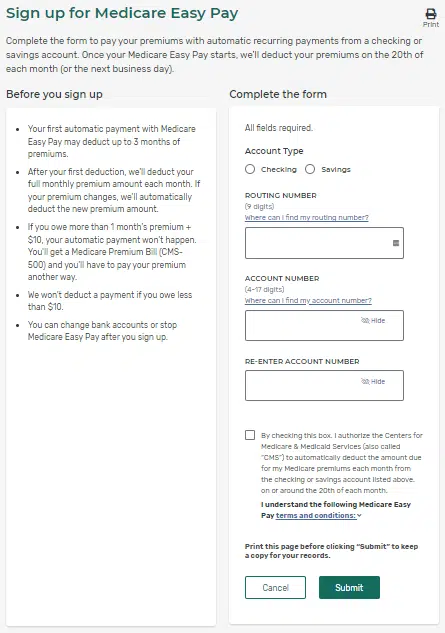
Carefully enter:
- Bank routing number
- Bank account number
Confirm the authorization checkbox and click Submit.
Once completed, Medicare will begin withdrawing your Part B premium automatically.

Medicare Doesn't Have To Be So Hard....
Schedule your FREE consultation to have our team answer your questions and make Medicare easy for you!
Common Questions About Easy Pay
It usually takes 4–6 weeks for Easy Pay to become active. Until then, continue paying any bills you receive to avoid late payments.
Yes. If your Part B premium increases or decreases, Medicare automatically updates the amount withdrawn — no action needed from you.
Medicare bills quarterly by default when you are not yet receiving Social Security. That’s why the first bill is often higher than expected.
Payments are typically withdrawn around the 20th of each month, though timing can vary slightly.
Once you begin collecting Social Security benefits, your Part B premium is usually deducted directly from your Social Security check, and Medicare Easy Pay is no longer needed.
Summary
Until you begin receiving Social Security benefits, Medicare Easy Pay is the easiest and safest way to pay your Medicare Part B premium.
If you’d like help setting it up — or just want someone to double-check that everything looks right — we’re happy to help.
Schedule your FREE appointment and we’ll make Medicare simple.